Get an Exclusive Preview of the World's First AI Planner

Learn moreright arrow

Fashion PLM comparison

WFX PLM vs Infor PLM for Fashion: Product Development, CloudSuite & Integrations

See how WFX PLM and Infor PLM for Fashion approach product development, sourcing, supplier work, AI and connections with other business systems.

Reviewed 18 September 2026Review methodology and sources

The short answer

WFX PLM is built for the everyday work behind fashion product development, including costing, sourcing and supplier coordination. Infor PLM for Fashion covers design through production and can run independently or alongside Infor CloudSuite Fashion. The clearest way to compare them is to put the same collection and supplier workflow through both systems.

Consider WFX PLM when

Your product team wants costing, sourcing, RFQs, sampling and supplier approvals to stay close to the style being developed.

Consider Infor PLM for Fashion when

Infor is already part of your business systems, or CloudSuite Fashion is part of the wider technology plan.

At a glance

How do WFX PLM and Infor PLM for Fashion compare?

WFX and Infor both cover fashion product development, but they sit in different operating contexts. The comparison becomes more useful when you look at how product information moves into sourcing, production and other systems.

WFX vs Infor PLM: where to focus your evaluation

Comparison pointWFX PLM Infor PLM for Fashion
Product development
WFX PLM

Manage collections, product data, BOMs, POMs, tech packs, costing, samples and approvals in WFX PLM.

Infor PLM for Fashion

Manage collections, styles and SKUs as products move from design into sourcing and production.

Supplier work
WFX PLM

Suppliers can take part in RFQs, comments and approval steps within the product-development process.

Infor PLM for Fashion

Infor supports collaboration between internal teams and external partners involved in developing the product.

Design tools
WFX PLM

WFX PLM connects with Adobe Illustrator through a two-way integration.

Infor PLM for Fashion

Infor PLM for Fashion also supports bidirectional Adobe Illustrator integration.

Where it sits
WFX PLM

WFX PLM can be used with other WFX applications, depending on the systems your business needs.

Infor PLM for Fashion

Infor PLM for Fashion can run as a standalone SaaS product or sit within an Infor CloudSuite Fashion environment.

What to check in the proposal
WFX PLM

Ask which workflows, integrations and services are included in the WFX scope.

Infor PLM for Fashion

Ask which PLM, CloudSuite, integration and implementation elements are included in the Infor scope.

This overview separates published vendor facts from WFX buyer-fit guidance.

See your fashion workflow in WFX

Bring one style, supplier scenario and integration list to the demo.

Book a WFX PLM Demo

Main difference

Where do WFX and Infor PLM for Fashion differ?

The overlap is in product development. The difference is easier to see once product information needs to move into sourcing, production and the wider business.

WFX

Keep product and sourcing decisions connected

WFX brings product information, costing, RFQs, samples, supplier access and approvals into its fashion PLM workflows. In a demo, follow one style through a supplier decision and see where the information stays connected.

Infor

Connect PLM with the wider Infor environment

Infor positions PLM for Fashion across design, sourcing and production, with connections to Infor and third-party applications. Check which PLM and CloudSuite components are included in the setup being proposed.

Compare the implementation model. Ask both vendors to scope the same users, product data, integrations and go-live requirements.
Fashion workflows

How do WFX and Infor PLM for Fashion manage product development?

Take one collection, change one material and run one supplier review. That gives you a practical way to see how each system handles the work your team does during development.

Published product-development capabilities

Comparison pointWFX PLMInfor PLM for Fashion
Collections and style data
WFX PLM

Product and material libraries, collections, colorways, BOMs, POMs and tech packs.

Infor PLM for Fashion

Collection, style and SKU management across product development.

Materials, trims and BOMs
WFX PLM

Material management, BOMs, costing and sourcing workflows.

Infor PLM for Fashion

Material and trim development, BOM management and component libraries.

Samples and approvals
WFX PLM

Sample comments, approvals and supplier collaboration.

Infor PLM for Fashion

Sample, cost quote, lab dip and test workflows.

Design integration
WFX PLM

Bidirectional Adobe Illustrator integration.

Infor PLM for Fashion

Bidirectional Adobe Illustrator integration.

Access and collaboration
WFX PLM

Cloud platform with supplier collaboration workflows.

Infor PLM for Fashion

Browser-based access with collaboration across teams and external partners.

Confirm the edition, integrations, data direction and services included in each proposal.

AI comparison

How should you compare WFX AI with Infor’s AI capabilities?

WFX publishes AI features built around fashion product-development tasks. Infor talks about AI, analytics and automation across its wider enterprise platform. The useful comparison is what each system can actually demonstrate inside the PLM setup you are considering.

Comparison pointWFX PLMInfor PLM for Fashion
Fashion product AI
WFX PLM

Product search, AI moodboards and design concepts, visual product search, tech-pack data extraction and attribute tagging.

Infor PLM for Fashion

Infor describes automation, analytics and AI across its wider platform. Confirm which functions are available within your PLM scope.

Product data
WFX PLM

Test WFX using your own styles, product images and PDF tech packs.

Infor PLM for Fashion

Ask Infor to demonstrate the AI functions available with your own product data.

Controls
WFX PLM

Review outputs, edits and the manual work that remains.

Infor PLM for Fashion

Confirm data sources, permissions and review controls for your setup.

Test the task, not the AI label. Use the same product data in both demos and see what your team still needs to review, correct or complete manually.

Enterprise workflow test

How should you test PLM-to-enterprise handover?

Use the same product scenario in both demos and follow the information once a product decision has been approved.

01

Build the product record

Create or review one style with its materials, measurements, BOM, artwork and attachments.

02

Follow one supplier decision

Record a quote, comment or approval and check where that decision stays visible against the style.

03

Check the handover

See which approved product and sourcing information reaches the next operational or enterprise system.

Implementation

How should you compare rollout expectations?

WFX PLM

Typical rollout

8 to 12 weeks

WFX typically quotes 8 to 12 weeks for a PLM rollout. The actual timeline will depend on workflows, data, integrations and training.

Infor PLM for Fashion

Core Plan Onboarding

Project-specific timeline

Infor supports SaaS deployment and CloudSuite Fashion configurations. Ask for a timeline based on your data, integrations, users and chosen setup.

Compare equivalent scope. A standalone PLM rollout and a PLM deployment tied into a wider enterprise environment are not the same project.

Pricing and scope

What should a WFX PLM vs Infor PLM for Fashion proposal include?

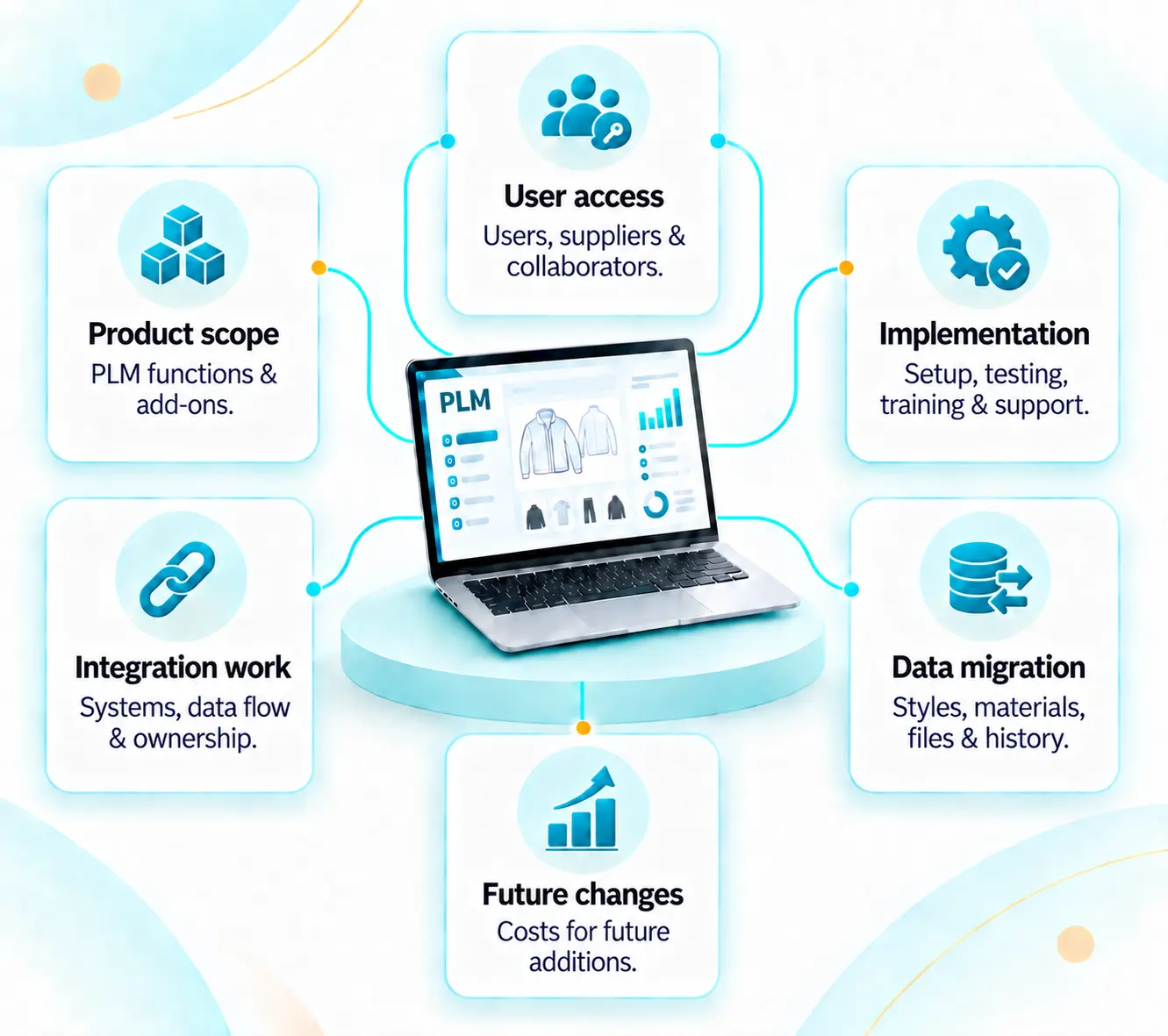
The vendor information reviewed does not give a like-for-like total price. Ask both vendors to quote against the same users, workflows, integrations and implementation requirements.

:
WFX PLM vs Infor PLM

Product scope

List the PLM functions and any additional applications included.

User access

Separate internal users, suppliers and external collaborators.

Data migration

List the styles, materials, documents and historical data to be migrated.

Integration work

Define the systems being connected, the data moving between them and who owns the integration.

Implementation

Include configuration, testing, training and go-live support.

Future changes

Clarify the cost of adding users, modules, integrations or services later.

Which to choose

When may WFX PLM or Infor PLM for Fashion fit your requirements?

Start with the way product development needs to work with the rest of your fashion business. These buyer-fit points are based on the published product information reviewed.

Consider WFX PLM when

  • Costing, sourcing, RFQs and supplier approvals need to stay close to the product-development process.
  • You want fashion-specific AI tasks demonstrated inside the PLM workflow.
  • You want a defined PLM rollout and need PLM to connect with other systems in your technology stack.
Consider Infor PLM for Fashion when

  • Infor is already part of your business systems, or CloudSuite Fashion is part of the wider technology plan.
  • Your product-development process runs across design, sourcing and production.
  • Your evaluation also includes enterprise integrations and implementation planning.

Demo checklist

Run the same collection scenario in both demos

Use one style, one material update and one supplier approval. Follow what happens to the information after each step.

01

Start with a collection

Use the same season, style and source files in both demos.

02

Set product details

Add materials, measurements, BOM and construction requirements.

03

Involve the supplier

Test comments, quotes, notifications and approvals.

04

Change one detail

Update a material, measurement or construction note.

05

Check the handover

Follow approved product information into the next business process.

06

Review the proposal

Compare integrations, training, support, timeline and overall scope.

PLM Buyer Guide

Compare PLM within your wider technology stack

Use the WFX PLM Buyer Guide to define your requirements, prepare for demos and compare vendor responses against the same criteria.

Requirement planning Vendor scorecardDemo preparation

For fashion product, sourcing and technology teams.

Get the PLM Buyer Guide →

Use it alongside this comparison.

Frequently asked questions

WFX PLM vs Infor PLM for Fashion FAQs

Editorial review

Prepared by WFX

Official WFX and Infor product information reviewed on 18 September 2026. Published product facts are kept separate from WFX buyer-fit guidance and suggested demo exercises.

Last reviewed: 18 September 2026

Sources and comparison method

We used publicly available WFX and Infor information for the product claims on this page. Some capabilities may be available even when they are not described on the pages reviewed, so features, pricing, integrations and services should be confirmed with each vendor before making a final decision.

  1. 1.WFX Fashion PLM
  2. 2.Infor PLM for Fashion
  3. 3.Infor PLM solutions
  4. 4.Infor CloudSuite PLM for Fashion documentation

WFX publishes this comparison as one of the vendors evaluated. Infor and Infor PLM for Fashion are trademarks of Infor. WFX is not affiliated with Infor.

See your fashion workflow in WFX PLM

Bring one style, one supplier scenario and your integration list to a WFX PLM demo.