Get an Exclusive Preview of the World's First AI Planner
Learn more
Get an Exclusive Preview of the World's First AI Planner
Learn moreFashion PLM comparison
Compare WFX PLM and Lectra Kubix Link on tech packs, supplier work, PIM, AI, pricing and rollout. See which platform fits the way your fashion team works.
WFX PLM and Lectra Kubix Link are cloud platforms built for fashion. WFX brings development, costing, samples and supplier work into one product record. Kubix Link combines fashion PLM with product information management (PIM), digital moodboards and online forms. Compare how each handles the work your team does every day.
Consider WFX PLM when
Your mid-sized or enterprise fashion brand needs collections, tech packs, costs, samples and approvals in one place, with suppliers working from the same records and AI to help with product tasks.
Consider Lectra Kubix Link when
You need PLM with PIM for sales and marketing, Board for moodboards and Forms for data collection, or want to connect with Lectra design tools you already use.
At a glance
Start with the work both platforms cover, then compare how product information reaches suppliers, sales and marketing. Check which tools come with each proposal and which need to be added.
WFX PLM vs Lectra Kubix Link, reviewed September 2026
Mid-sized and enterprise fashion brands managing multiple collections, product teams and suppliers
Fashion brands that need PLM with PIM, digital moodboards and online forms for product information
Line planning, product development, tech packs, costing, sampling, approvals, sourcing, quality and order visibility
Collection planning and tracking, product data, tech packs, costing, fitting reviews, supplier collaboration and sustainability information
Product attributes and descriptions prepared for PIM and e-commerce systems
PLM with PIM, Board and Forms in the Kubix Link range
Product search, AI moodboards and design concepts, PDF tech pack creation, visual product search and attribute tagging
Board supports digital moodboards; Retviews provides AI market intelligence as a separate Lectra product
Two-way Adobe Illustrator connector; Browzwear upcoming
Fashion CAD data exchange; Lectra lists Adobe Illustrator and InDesign connections
Vendor Portal with role-based access
Supplier collaboration and data collection through Forms
40+ connectors, open REST APIs and links to existing ERP systems
Lectra lists ERP, CMS, WMS, Excel, InDesign, Adobe Illustrator and fashion CAD connectivity
8 to 12 weeks typical rollout
No standard duration published on the reviewed product page
No standard price published on the reviewed product page
No standard price published on the reviewed product page
ISO/IEC 27001:2022, SOC 2 and GDPR stated
SOC 2 Type II stated on the Kubix Link product page
Check what each subscription includes. Ask both vendors to list modules, users, supplier access, integrations and services, so you can compare the same scope.
Compare both platforms using one real collection
Bring a tech pack, supplier quote and approval to your demo.
What each covers
WFX PLM keeps product development and sourcing together, with tech packs, costs, samples and supplier updates in the same record. Kubix Link also supports fashion development, with PIM, Board and Forms for teams managing product information beyond development.
In WFX PLM, teams work on the same style record as designs, costs and samples change. Suppliers quote, comment and share updates through the Vendor Portal. Connect the approved product data to your existing ERP and sales systems.
Kubix Link PIM gives sales and marketing teams access to product information. Board organizes collection inspiration, while Forms collects data online. Confirm which tools your proposed package includes.
Fashion workflows
Use the same style in each demo. Change a material, revise its cost and send a sample for approval. Check who sees the update and whether your team needs to enter the same information again.
Fashion workflow comparison
Line planning, buying plans and critical-path tracking
Collection calendars, milestones, roles, dashboards and cost monitoring
Product, fabric and trim libraries with reusable records
Central product data, change tracking and related Kubix Link PIM
Versioned tech packs, BOMs, POMs, grading and tolerances
Digital tech packs, one-page product documents and CAD data exchange
Supplier RFQs, quote comparison, costing and margin checks
Collection and cost monitoring within configurable workflows
Proto, fit, size-set, PP and TOP sample tracking
Digital fitting sessions, collection reviews and stakeholder feedback
Vendor Portal for quotations, comments, approvals and updates
Internal, external and supplier collaboration with mobile image upload
Vendor compliance, audits, final inspection and PO or shipment status
Ask how quality checks, purchase orders and shipments are handled
AI moodboards and attribute tagging inside PLM workflows
ConfirmKubix Link PIM and Kubix Link Board within the product range
Adobe Illustrator connector; Browzwear listed as upcoming
Fashion CAD data exchange, with Adobe Illustrator and InDesign connections listed
Published features are a starting point. Test the steps your team needs in each demo.
AI and product data
WFX lists AI tools for product development. Kubix Link lists digital boards, PIM and online forms. Retviews is a separate Lectra AI product. Ask each vendor to show what is available in your package.
AI and product data by task
Product Search helps teams find styles, samples and tech packs
ConfirmAsk Lectra to demonstrate AI product search
Visual Product Search finds similar styles using an image reference
Ask Lectra to show image search in Kubix Link. Retviews product matching is a separate market-intelligence capability.
PDF Tech Pack Creation converts PDF specifications into structured data for review
ConfirmAsk Lectra to show how PDF tech packs become product records
AI Moodboards and Design Concepts support collection inspiration, colorways and prints
Kubix Link Board organizes digital moodboards; generative AI is not stated on the page reviewed
Not presented as a core WFX PLM feature
Retviews is Lectra's separate AI fashion market-intelligence product
Attribute tagging prepares product descriptions
Kubix Link PIM serves sales and marketing teams
The Vendor Portal keeps supplier comments and updates with product records
ConfirmKubix Link Forms collects data through online forms; confirm the automation included
Digital tools are not always AI features: A moodboard or form alone does not confirm AI functionality. Test each task in the demo. Retviews and TextileGenesis are separate Lectra products. A feature missing from a public page may still be available; ask the vendor.
Implementation
8 to 12 weeks
WFX lists a typical 8–12 week rollout. Timing depends on data, workflows and integrations, with configuration, migration and training included.
Not disclosed
Lectra does not give a standard Kubix Link rollout time on the page reviewed. Ask for a schedule covering PLM, any PIM or Forms work, migration, connections and supplier onboarding.
Pricing and TCO
The WFX PLM and Kubix Link pages reviewed in September 2026 do not list standard prices. Request quotes for the same users, supplier access and rollout work, with any extra products priced separately.
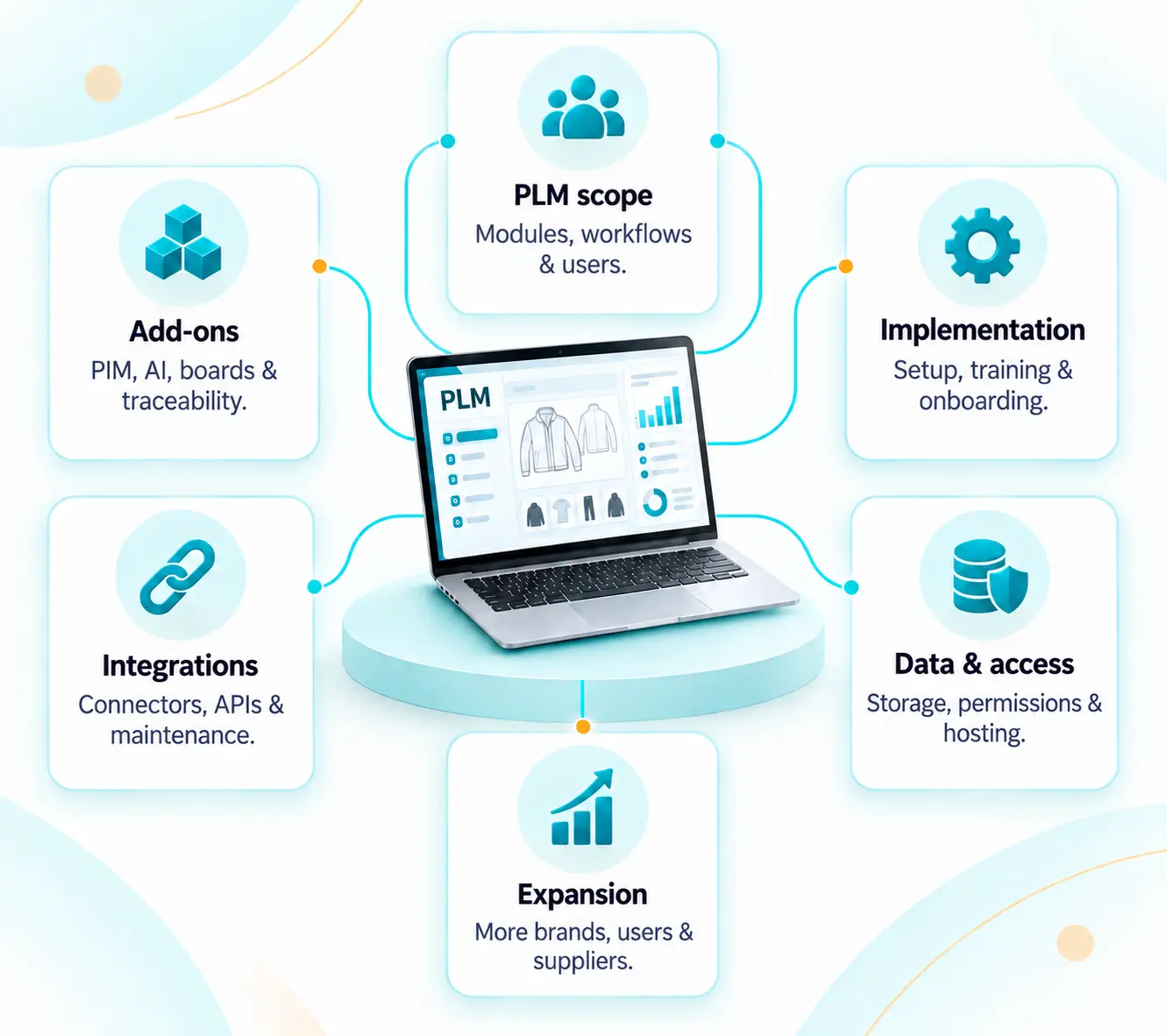
Modules, workflows, brands, categories, users and supplier access.
PIM, digital boards, AI tools or traceability added to your PLM scope.
Data cleanup, setup, testing, training and supplier onboarding.
Connector fees, data mapping, API access and ongoing maintenance.
Storage, test environments, permissions and regional hosting needs.
Added brands, users, suppliers and data as your business grows.
Best-fit decision
Start with how your team develops products, then decide how much sales and marketing content your PLM needs to manage.
Demo checklist
Follow one style through development, supplier work and sales content in each demo.
Build the style, request a sample and check who can see each fit comment.
Change a material and check how its cost and approval reach the supplier.
Follow approved attributes into PIM and check which team owns the final product description.
Upload a PDF or image. Check what is extracted and how your team corrects errors.
Move an Illustrator file into each PLM and check updates, versions and access.
List PLM, PIM, Board, Forms, AI, services and recurring fees in each proposal.
PLM Buyer Guide
Use the WFX PLM Buyer Guide to list the workflows you need, score both demos and agree what each vendor should include.
For fashion product, sourcing and technology teams
Get the PLM Buyer Guide →Use it alongside this comparison
Frequently asked questions
Editorial review
Prepared by WFX
Reviewed against public WFX and Lectra pages for product scope, AI, integrations, pricing and rollout. This update focuses on Kubix Link PLM, PIM, Board and Forms.
Last reviewed: 16 September 2026
Product facts come from the linked vendor pages. Fit recommendations are WFX's assessment. Missing public information is not treated as a missing feature.
Publisher disclosure: WFX prepared this comparison from public vendor information. Fit recommendations reflect WFX's assessment. Confirm current features, pricing and availability with each vendor. Lectra and its product names are trademarks of their respective owners. WFX is not affiliated with Lectra.
Bring the workflow you are comparing with Kubix Link. See how WFX manages it in a live demo.