1. WFX PLM
  2. Features
  3. Tech Pack
Fashion Tech Pack Software

Every detail, everyone aligned with fashion tech pack software

Build the spec once, align every vendor and sample it right the first time. Turn a design concept into a production-ready tech pack that carries your flats, materials, measurements and supplier feedback on a single version-controlled record.

One source of truthEvery revision trackedEvery supplier aligned
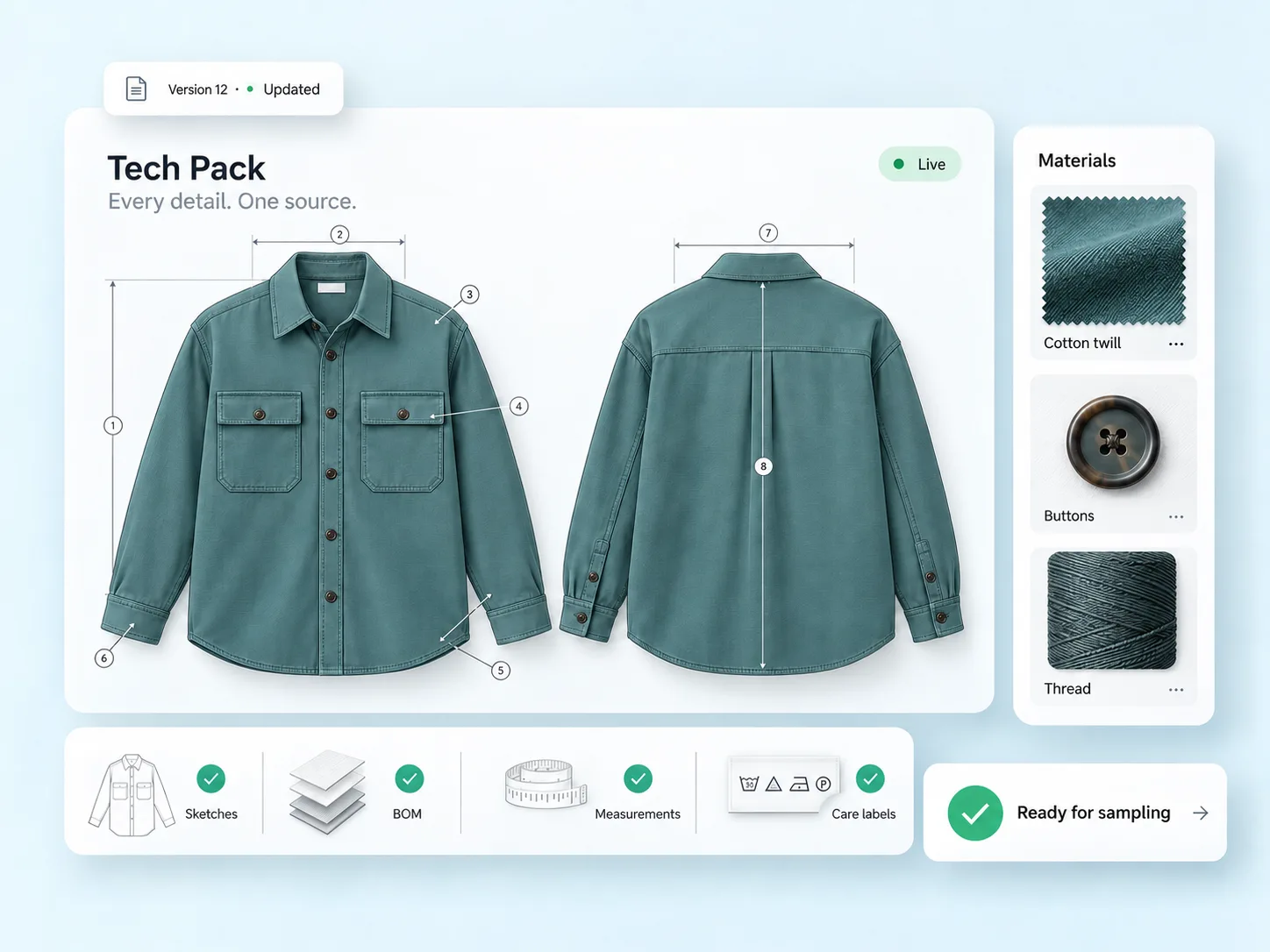
WFX fashion tech pack software showing a teal shirt tech pack: front and back flats with numbered measurement callouts, cotton twill, button and thread materials, and checks for sketches, BOM, measurements and care labels, marked ready for sampling
Overview

What is fashion tech pack software? One spec, not six versions.

Fashion tech pack software turns a garment’s specification into one live record: flat sketches, construction callouts, a bill of materials, points of measurement with tolerances and care instructions, all in the place your factory reads from. It replaces the spreadsheets, static PDFs and email chains where versions multiply, detail gets lost and no one knows which file is current.

Because WFX Tech Pack runs inside WFX Fashion PLM, your spec shares the same live data as design, costing and sourcing. As materials change, measurements grade and comments come in, the tech pack updates in place, so every team and vendor works from the same version. Built for fashion, apparel, footwear and lifestyle brands.

What’s inside a WFX tech pack
  • Flat sketches with construction callouts
  • One bill of materials for every component
  • Points of measurement and auto-grading
  • Care labels, translations and compliance
  • Colorways, artwork and 3D
  • Version history and comments against the style
Challenges solved

Building tech packs in PDFs, with no single version.

Flats in Illustrator, the BOM in a spreadsheet, comments across three inboxes. One style is manageable. Two hundred styles across a season is where it breaks, and by the time the sample comes back wrong your factory has already cut.

01 Version

The wrong version ships

Your team updates the spec while the factory keeps working from last week's PDF, so you pay for another sample round.

02 Detail

Construction gets guessed

A spreadsheet cannot show a topstitch, a callout or a graded measurement properly, so your factory interprets it.

03 Re-keying

Data is typed twice

Every fabric code and measurement is copied from a PDF into ERP by hand, slow and error-prone at scale.

Capabilities

Everything a spec needs, in one fashion tech pack suite.

Drawings, BOM, measurements, feedback, versions and suppliers. Eight connected capabilities that take a style from first sketch to a spec your factory can sample from.

01

Complete digital tech packs

Pull style information, drawings, construction notes and care details into one structured tech pack. Every style opens in the same layout, so your vendors stop asking where the trim detail sits.

STYLE INFODRAWINGSCONSTRUCTIONOne tech pack

The valueBriefs your vendors can act on.

02

Integrated bill of materials

Hold every component in the spec itself, from body fabric to polybag, each one linked to the material records your sourcing team keeps. Update a supplier once and the BOM follows.

The valueNothing goes missing in the handover.

03

Visual clarity for construction

Mark the flat where it matters: topstitch spacing, seam type, pocket placement, trim position. Where a detail is hard to draw, add a reference photo or the 3D.

The valueLess guesswork between design intent and the sample.

04

Measurements, grading and tolerances

Hold points of measure, size specs and tolerances in tables built for apparel. Set your base size and the grading rules, and the range follows.

½ chest ±0.5Body length ±1.0Graded S to XXL

The valueFit that holds from S to XXL.

05

Comments, feedback and approvals

Hold every comment against the style it belongs to. Your team and your vendors work one thread, not two, and the people affected hear about a change as it happens.

The valueFewer lost threads and faster answers.

06

Version control

Every revision is kept, with a record of who changed what and when. One version is current, and it is clear which one.

The valueNo one works from an outdated spec.

07

Supplier collaboration

Open the tech pack to your suppliers inside WFX rather than mailing files out. Each vendor sees the data, comments and revisions for their part of the style.

The valueFewer follow-ups before sampling.

08

Connected design workflows

Artwork from Adobe Illustrator and your digital assets flow straight into the tech pack and on through WFX Cloud PLM. Redraw a placement print in Illustrator and the tech pack picks it up.

ADOBE ILLUSTRATORDIGITAL ASSETSWFX Cloud PLM

The valueDesign work and product data stay in step.
See your next tech pack come together in one place.

Get a 30-minute walkthrough of WFX fashion tech pack software with your own styles, BOMs and measurement specs.

  • Live on your data
  • Tailored to your team
  • Built into WFX PLM
Live version control

Every version, every comment, in one view.

As flats are approved, the BOM is completed, measurements are graded and comments are resolved, get one live view of where every spec stands, so the factory only ever cuts from the current version.

Style #WFX-01 · Version 12Current
92%of spec
Flats approved4 / 4
Measurements graded18 / 20
Comments resolved23 / 25
Spec by section
Flats4
BOM lines14
POMs20
Sizes5
1

A change is made

A fabric is swapped or a measurement is updated in the tech pack.

2

Everyone sees it

The new version is live for your team and every vendor at the same time.

3

Comments stay with the style

Feedback is stored against the spec, where the next person will find it.

4

The factory cuts from current

No old PDFs in circulation, so no wasted sample rounds.

Inside the tech pack

A tech pack your factory can actually read.

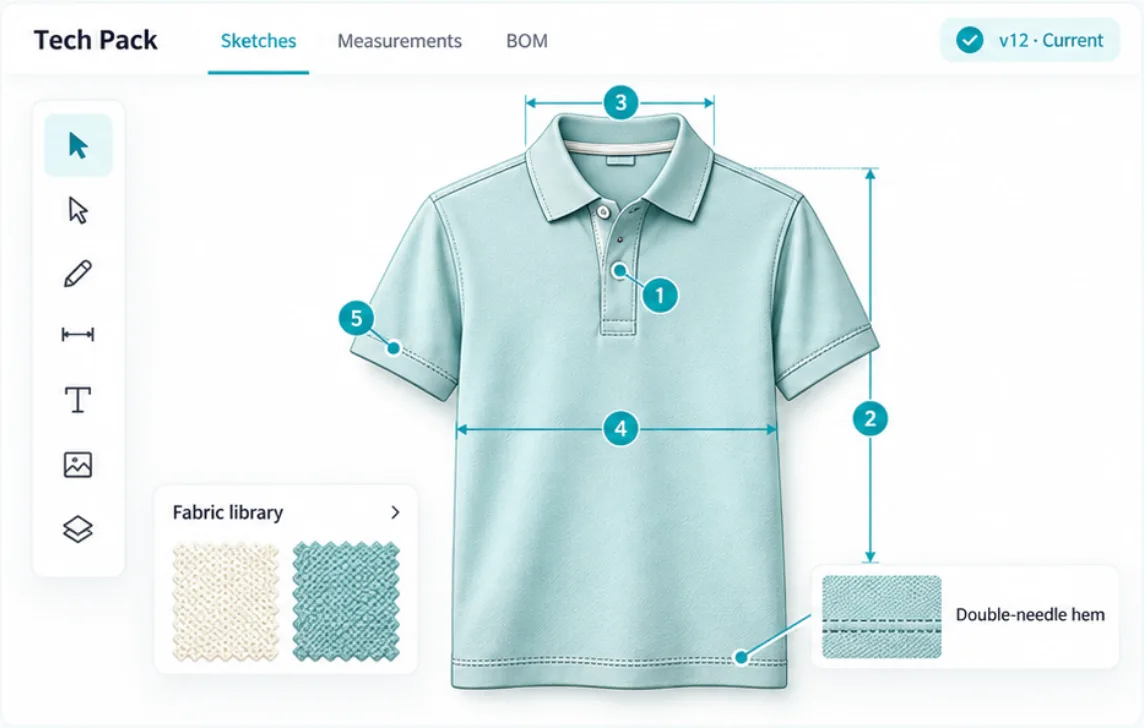
Flats, measurements and BOM sit side by side, with a running version history, so what your factory opens is what your tech designer last saved.

WFX fashion tech pack software editor showing a polo flat with five numbered measurement callouts, a fabric library and a double-needle hem detail, marked v12 current

Central library

One database of styles, materials and trims, available to your team anytime, anywhere.

Faster creation

Two-way Adobe Illustrator connector, templates and copy functions, so you build a spec in less time.

Control and annotation

Built-in version control and image annotation on every style.

Sketch. Specify. Grade. Share.

How to create a tech pack in WFX.

From a first flat to a factory-ready spec in four connected steps, without leaving your PLM.

01 Sketch

Start from your flat

Bring flats and artwork in from Adobe Illustrator and add the construction callouts.

ADOBE CONNECTOR
02 Specify

Build the BOM

List every fabric, trim and label with quantity, price, color and supplier, pulled from your material library.

FABRIC · TRIMS · LABELS
03 Grade

Add measurements

Set points of measurement and tolerances, then auto-grade the size range.

S to XXL AUTO-GRADED
04 Share

Send it to the factory

Vendors read, comment and work from the current version in the Vendor Portal.

VENDOR PORTAL
WFX AI

Upload a PDF. Get ERP-ready data.

WFX AI Tech Pack Automation reads any tech pack PDF, pulls out the details with fashion-trained models and syncs clean data in minutes, not weeks.

1

Upload the PDF

AI scans and organizes the tables, text and images in the tech pack.

2

Extract the details

Fabrics, BOM, trims and measurements are pulled out and mapped to your ERP fields.

3

Validate

Data is checked against your business rules, and gaps are flagged before production.

4

Sync and learn

Clean data flows into your ERP, and the model gets more accurate with every tech pack.

TP_CrewTee_v12.pdf → ERPSynced
Fabrics3 extracted
BOM14 lines
Trims6 extracted
Measurements1 flagged
70%faster processing
~30%fewer entry errors
Weeks to daysPDF to production data

Reported by a global brand after adopting WFX AI Tech Pack Automation.

Why brands choose WFX

Less manual work. Fewer errors. More control.

Because WFX fashion tech pack software lives on one cloud platform with materials, costing, sampling, approvals and sourcing, distributed teams and suppliers all work from the same product record.

01 Less manual work

Develop products faster

Give every team one way to build, share and update a tech pack, and stop keying the same detail twice.

02 Fewer errors

Keep product data accurate

Specs, materials, measurements and revisions stay organized in one connected record.

03 Better collaboration

Unify teams and suppliers

The right people see the right information, without hunting through email attachments.

04 More control

Connect the whole lifecycle

Your tech packs sit alongside materials, costing, sampling, approvals and sourcing, so no handover happens off the record.

Who it helps

One tech pack, every team building from it.

Because the tech pack lives inside PLM, your design studio and your factory floor read the same spec on the same day.

Design

For designers & technical designers

Keep design intent intact from sketch to sample
Build specs faster with templates and copy
Annotate flats and images in context
Development

For product development

Manage BOM, measurements and grading in one place
Fewer sample rounds and less wasted fabric
One version across styles and seasons
Sourcing

For sourcing & manufacturers

Read clear flats, callouts and graded measurements
Comment in the Vendor Portal, not by email
Always cut from the current, approved version
WFX was initially implemented for PLM, but it quickly evolved into PLM with Purchase Order management to facilitate worldwide market buying.
Matt Keays, General Manager, Global I.T at Forever NewMatt KeaysGeneral Manager, Global I.T, Forever New
Integrations

Your spec connects to everything downstream.

Artwork moves both ways with Adobe Illustrator. 3D arrives from CLO. Approved specs carry into your ERP. Through all of it the tech pack stays the record everything else refers back to.

Adobe Illustrator

Sync flats, artboards and text both ways with the Adobe Illustrator connector, instead of redrawing them by hand.

3D from CLO

Add realistic 3D to the tech pack, so vendors see the finished garment, not just a flat.

WFX Vendor Portal

Share the live tech pack and graded measurements with every vendor, with comments kept against the style.

ERP connectors

Push approved, ERP-ready data into Oracle NetSuite, SAP, Microsoft Dynamics or AIMS360.

FAQ

Tech pack questions, answered.

Fashion tech pack software helps a brand build the complete specification for a garment: flat sketches with construction callouts, a bill of materials, points of measurement with tolerances and grading, care labels and 3D, all in one live record that manufacturers read from, with version control so everyone works from the current spec.

Yes. Tech Pack is a feature of WFX Fashion PLM. The tech pack shares the same live data as design, costing and sourcing, so a change to the spec flows through the whole product lifecycle without anyone re-keying it.

A complete tech pack includes flat technical sketches with construction callouts, a bill of materials (BOM), points of measurement and grading, colorways and artwork, care label and compliance information, and a version history so everyone works from the latest specification.

Yes. WFX AI Tech Pack Automation reads a tech pack PDF, extracts fabrics, BOM, trims and measurements with fashion-trained models, validates them against your business rules, and syncs ERP-ready data in minutes, getting more accurate with every tech pack it processes.

Yes. Suppliers work inside the WFX Vendor Portal with the tech pack and graded measurements they can read without a follow-up email, and every comment is stored against the style.

Designers and technical designers build the tech pack, product developers manage materials and measurements, and sourcing teams and manufacturers work from it, so the whole team makes the garment from one shared, current spec.

Get started

See the Tech Pack Suite inside WFX Cloud PLM.

One tech pack, every detail, everyone aligned. Book a walkthrough of WFX fashion tech pack software and the wider fashion PLM.

SketchFlats and callouts
SpecifyOne live BOM
ShareEvery vendor, current version

No obligation. A WFX specialist will get in touch to arrange a time.