Get an Exclusive Preview of the World's First AI Planner

Learn moreright arrow

NetSuite x Fashion PLM: How WFX’s ‘Built for NetSuite’ PLM Connector Works

12 mins read • 12th, Jul 2026

Introduction

WFX is the only fashion PLM with a ‘Built for NetSuite’ certified connector, and a natural choice for NetSuite ERP users. Any product data created, modified or deleted in WFX PLM is automatically synchronized with NetSuite, which gives you a single accurate product view across your business, encompassing design, inventory and sales. 

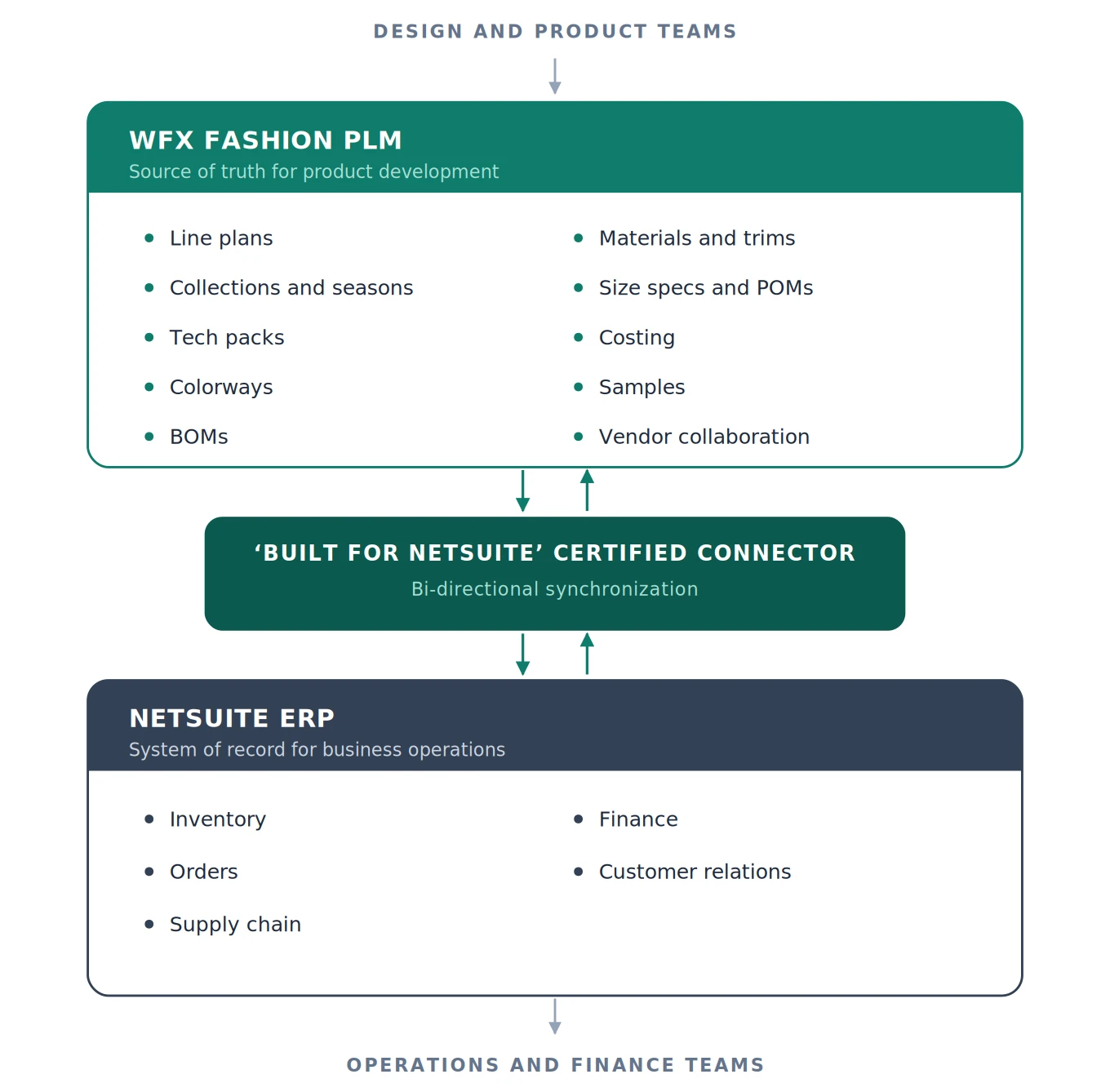
The point of the integration is division of labor. WFX Fashion PLM holds the source of truth for product development, from line plan through tech pack, costing and sampling. NetSuite runs the operational and financial side, from inventory and orders through supply chain and finance. The connector keeps both working from the same product definition. 

Key takeaways

  • WFX is the only fashion PLM with a ‘Built for NetSuite’ certified connector, and it is featured on the NetSuite App Store, called SuiteApp. 
  • The NetSuite integration is bi-directional. WFX pushes product information into NetSuite and pulls information such as purchase orders back from NetSuite. 
  • Products, components, purchase orders and samples export from WFX to NetSuite on predefined triggers or schedules. 
  • WFX holds the fashion-native objects. Colorways, seasons, size runs, trims, fit types and points of measure are built in, not custom fields bolted on. 
  • Customers choose when an item moves across. Some transfer products only once they have commercial significance. Others sync all data regardless of production status. 
  • WFX offers 40+ connectors out of the box and a REST open API for custom flows, with an average rollout of two to six weeks. 

What is the NetSuite x WFX Fashion PLM Connector?

PLM Connector

It links WFX PLM straight to NetSuite ERP. Product data moves between the two on its own, so nobody is rekeying a spreadsheet at either end. Less manual entry, fewer errors. 

No other fashion PLM carries a ‘Built for NetSuite’ certified connector. WFX is listed on the NetSuite App Store, SuiteApp. 

Product details, materials, samples, purchase orders. All of it moves between design and production without anyone chasing it, and every department reads the same version. 

What WFX Fashion PLM manages before anything reaches NetSuite

To understand what the connector does, it helps to know what sits on the PLM side of it. WFX runs the full product lifecycle across five stages. 

Stage  What WFX manages 
Plan  Line planning and buying plans. Visualize the collection, filter by season, style and color, and build the product mix that hits your margin targets. 
Design  Design inspiration, artwork gallery and a native Adobe Illustrator connector. Artwork is version-controlled with ‘where used’, so one change updates every product it touches. 
Develop  Tech packs, product and material libraries, RFQs, costing, and sample feedback and approvals. Full BOM with fabrics, trims, suppliers and cost on every line, plus POM tables with auto-grading and tolerance defaults. 
Source  Vendor portals, vendor compliance, RFQ comparison and purchase order award. Compare FOB, lead time, MOQ and full cost across currencies. 
Produce  Sample tracking from proto to fit to size set to PP, iPad-first quality control, and live PO, production and shipment status on one timeline. 

The fashion-native object model 

This is the part that separates a fashion PLM from a generic one, and it is why the integration works the way it does. 

In WFX, colorways, seasons, size runs and trims are native objects, not custom fields you bolt on later. Fit types, lab dips and points of measure are built in the same way. Legacy PLM systems are SKU-first, which means fashion attributes get rigged up as custom fields after the fact. 

That matters for an ERP integration because the product definition leaving WFX is already structured. It is not a flattened spreadsheet export that someone has to interpret at the other end. 

Where PLM ends and NetSuite begins

The clearest way to think about the two systems is by what each one owns. 

netsuite plm architecture

WFX Fashion PLM holds the product definition. NetSuite ERP runs business operations. The certified connector keeps both in sync. 

You already run NetSuite for inventory, orders, supply chain, finance and customer relationships. What it does not run is how the product got made in the first place. PLM covers the product’s life from design through to disposal. ERP covers the business around it, so finance, HR and supply chain. 

Leave the two unconnected and design, development and production drift away from operations. Data fragments. Opportunities get missed. 

How does the connector work?

Five things are doing the work underneath, and all of them are configurable. 

Data mapping. You determine which fields in WFX map to which NetSuite fields. This ensures information like product descriptions, materials and colors is consistently transferred. 

Automated data transfer. The connector automatically exports relevant data from WFX to NetSuite based on predefined triggers or schedules. 

Real-time synchronization. When new products are created in WFX, the connector instantly updates NetSuite. Critical product data such as material availability or dimensions is readily accessible in both systems for smooth inventory and order management. 

Bi-directional data flow. The connector supports both push and pull. WFX can push product information into NetSuite, and also pull information like purchase orders from NetSuite back into WFX. This allows flexible workflows and better alignment across departments. 

Error handling and logging. Every transfer is logged, and failures get caught rather than passing quietly. When something breaks, you can see what broke. 

NetSuite is not the only one. WFX ships 40+ connectors out of the box, plus a REST open API when you need a custom flow. Typical rollout runs two to six weeks. 

What data moves between the systems?

Data  Direction  How it moves 
Products  WFX to NetSuite  Exported on predefined triggers or schedules 
Components  WFX to NetSuite  Exported on predefined triggers or schedules 
Samples  WFX to NetSuite  Exported on predefined triggers or schedules 
Purchase orders  Both directions  Pushed from WFX, and pulled from NetSuite back into WFX 

Beneath that, data mapping governs the detail. Product descriptions, materials, and colors transfer according to the field map you define. 

When does product data move from WFX to NetSuite?

Different customers choose when an item moves from WFX to NetSuite depending on their business model. Some prefer to transfer products only after they have commercial significance. Others sync all data regardless of production status. This flexibility matters, because it is what avoids clutter in NetSuite and keeps operations efficient. 

Two WFX customers show both approaches.


  Forever New  Simply Noelle 
Market  Australia  United States 
Trigger for export  An item is used in a purchase order  An item is created in WFX 
Product data stays in WFX until  The purchase order is created  Not applicable, export happens at creation 
Depends on development team adoption  Yes  No, both systems sync regardless 
Stated benefit  A streamlined process for production tracking and vendor collaboration  Both systems updated in real time, allowing flexible decision making 

Forever New keeps all product data within WFX until items are used in a purchase order. Once a PO is created, the connector automatically exports those items into NetSuite. 

Simply Noelle keeps WFX and NetSuite in sync regardless of whether products have been adopted by the development team. As soon as items are created in WFX, they are exported to NetSuite. 

Why choose a NetSuite approved connector?

NetSuite PLM Connector

The challenge with PLM applications that do not have a NetSuite-supported connector is that every integration is a custom project. That does not just require specific planning, development and maintenance for each client. It amplifies both the time and cost of delivering the integration, and it often results in a fragmented user experience, with users having to input data across several systems.

The risks of not using a standard connector run further than the build itself. 

Area  What happens without a standard NetSuite connector 
Nature of the work  Every integration is a custom project 
Planning, development and maintenance  Required specifically for each client 
Time to deliver  Amplified 
Cost to deliver  Amplified 
User experience  Often fragmented, with users inputting data across several systems 
Product data  Stored in disconnected systems, creating informational inconsistencies throughout the business 
Departments  Often left relying on inaccurate or outdated data 
Reporting  Data discrepancies across reports from diverse systems 
Net result  Confusion, mistakes and heightened costs 


What is a 'Built for NetSuite' connector?

NetSuite certified it. That covers how it integrates, how compatible it stays and how reliably it runs. It was built alongside NetSuite rather than bolted on afterwards, which is why it sits inside the ecosystem instead of next to it. 

Certification is not a one-off either. WFX keeps putting work into the connector as NetSuite ships updates, so it keeps pace with your business instead of falling behind it. 

Does NetSuite have a PLM system?

No, NetSuite itself does not offer a standalone PLM system. It does support robust PLM integrations with third-party solutions like WFX Fashion PLM. This brings PLM capabilities to NetSuite users in the fashion industry, bridging the gap between NetSuite’s native functionality and specialized PLM needs. 

Key Benefits of Using the Connector

One source of truth. All product data sits on one cloud platform, connected through to the rest of your stack. Open APIs push and pull it in real time, so your teams and your systems work from the same information instead of two versions of it. 

Less admin. Data moves on its own, so the duplicate entry goes away. Your team gets time back for the work they were hired to do. 

Fewer mistakes. Hand-copy anything often enough and something goes wrong. Automatic sync keeps PLM and ERP holding the same numbers, and that shows up downstream as fewer production delays. 

Quicker collaboration. Design, production and purchasing teams all work from the same information, which makes collaboration faster from creating samples through to managing vendor relationships. 

Scalability. The connector is designed to handle increasing volumes of data and complex workflows, which suits emerging labels and established global brands alike. 

Cost reduction. Automating routine processes and reducing errors minimizes the costs associated with data management, and lets teams focus on design, development and sales. 

Which fashion brands use the connector?

Brands that have benefited from the WFX PLM x NetSuite Connector include Skims, Everlane, Forever New, OAK + FORT, Cult Gaia, gorjana, Vermont Teddy Bear.

Three of them on what changed:

“We wouldn’t be able to grow as much without WFX. WFX’s cloud-based tech packs and integration with NetSuite have fostered accountability and collaboration across the board.” 

Angela Lavalla, Director of Product Development, Vermont Teddy Bear 

“WFX has improved our efficiency in sample requests and factory communication. With NetSuite integration, the entire process has become seamless, eliminating delays.” 

Megan Wise, Senior Product Manager, Feetures 

“With WFX’s integration with NetSuite, we centralized all our product data and streamlined communication across departments.” 

Cole Mancini, Product Development Manager, Noelle LLC (Simply Noelle) 

Frequently asked questions

How does the WFX NetSuite connector work? 

You map WFX fields to NetSuite fields once. After that the connector exports on triggers or a schedule you set, new products land in NetSuite straight away, and purchase orders come back the other way. Every transfer is logged and errors get caught. 

What data moves between WFX PLM and NetSuite? 

Products, components, purchase orders and samples. Field-level data such as product descriptions, materials and colors transfers according to the mapping you define. 

Is the WFX NetSuite integration one way or two way? 

Bi-directional. The connector supports both push and pull, so WFX can push product information into NetSuite and also pull information like purchase orders from NetSuite back into WFX. 

What does WFX PLM manage that NetSuite does not? 

Line planning, design and artwork, tech packs, colorways, BOMs, material and trim libraries, size specifications and points of measure, costing, sampling and vendor collaboration. In WFX these are native objects rather than custom fields, because the system was built for fashion rather than adapted to it. 

When does product data move from WFX to NetSuite? 

It depends on the business model. Forever New keeps all product data within WFX until items are used in a purchase order, then the connector exports them. Simply Noelle exports items as soon as they are created in WFX, regardless of whether the development team has adopted them. 

Can we control which products move to NetSuite? 

Yes. Some customers transfer products only after they have commercial significance. Others sync all data regardless of production status. This flexibility is what avoids clutter in NetSuite. 

What happens if a transfer fails? 

Built-in mechanisms capture errors and keep logs of every data transfer, which provides transparency and makes troubleshooting straightforward. 

Does WFX offer an API for custom integrations? 

Yes. Alongside 40+ connectors out of the box, WFX provides a REST open API for custom flows. Average rollout is two to six weeks. 

What is a ‘Built for NetSuite’ connector? 

NetSuite has certified it against their own standards for integration, compatibility and reliability. It was built with NetSuite rather than around them, and WFX keeps it current as NetSuite ships updates. 

Why not just build a custom integration to NetSuite? 

Without a NetSuite-supported connector every integration is a custom project, requiring specific planning, development and maintenance for each client. That amplifies both time and cost, and often results in a fragmented user experience with users inputting data across several systems. 

The bottom line

The NetSuite x WFX Fashion PLM Connector closes the gap between product development and operations. WFX holds the product definition, with colorways, tech packs, BOMs and size specs as native objects. NetSuite runs inventory, orders, supply chain and finance. The certified connector keeps both working from the same data. 

Without it, brands carry the burden of duplicating data entry across systems, which wastes time and introduces errors. 

Read Our Blogs

...
What Is a Fashion Mood Board? A Step-by-Step Guide to Creating One with AI

Learn what a fashion mood board is and how to create one in seconds using AI.

Read More
...
Top 10 Features of Apparel Manufacturing Software & ERP Solutions in 2026

Explore the top 10 essential features every apparel manufacturing software or ERP needs.

Read More
...
Apparel ERP Software: What It Is, Features, Benefits and How to Choose

Explore apparel ERP software features, benefits, and selection tips to streamline garment manufacturing operations efficiently.

Read More