Apparel and Textiles Warehouse Management System (WMS): From Fabric Rolls to Finished Goods

Learn moreright arrow

Tech Pack 101: Everything you need to know about fashion tech packs

10 mins read • 10th, May 2026

What Is a Fashion Tech Pack?

Fashion tech pack is a formal document that brands and designers provide to the manufacturer, which explains the precise details of how the garment needs to be manufactured. This includes technical sketches, specifications, materials list, color palettes, assembly guide, care guidelines, and cost estimates. The tech pack is the main mode of communication between the design team and the manufacturing unit, without any guesswork and mistakes in samples.  

Why Tech Packs Define Production Success

A tech pack is the most crucial document in apparel product development. If done right, everything goes well in the manufacturing process; if not, it leads to costly mistakes such as sample rejection, production re-runs, missing deadlines, and damaged business relations with suppliers.  

This guide covers everything related to the tech pack – from its elements to creation. Find out when a spec sheet is a better choice, what tools to use, and how to optimize the process for speed and accuracy. 

What Does a Fashion Tech Pack Include?

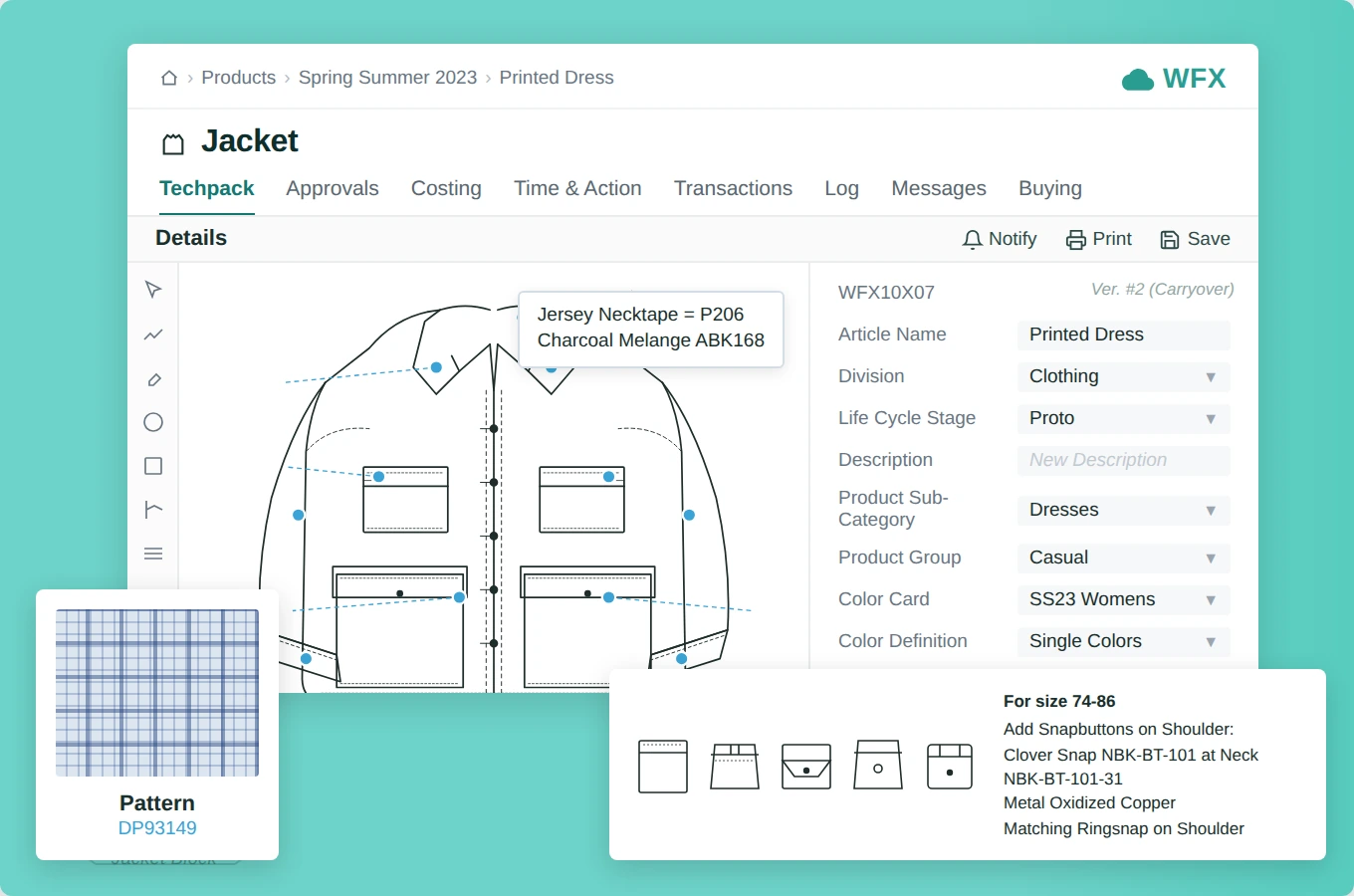
Fashion Tech Pack

A complete fashion tech pack contains nine core components: 

  1. Product Summary— Article name, product code, brief description, product type, colorway, gender, season, creation date, last modified date, country of origin, and retail price. Short but precise — this is the document’s header. 
  2. Technical Flats— Flat sketches showing the garment from every angle: front, back, side, and interior. These are the visual anchor of the tech pack. A common mistake is providing only a front view — factories need the full picture. 
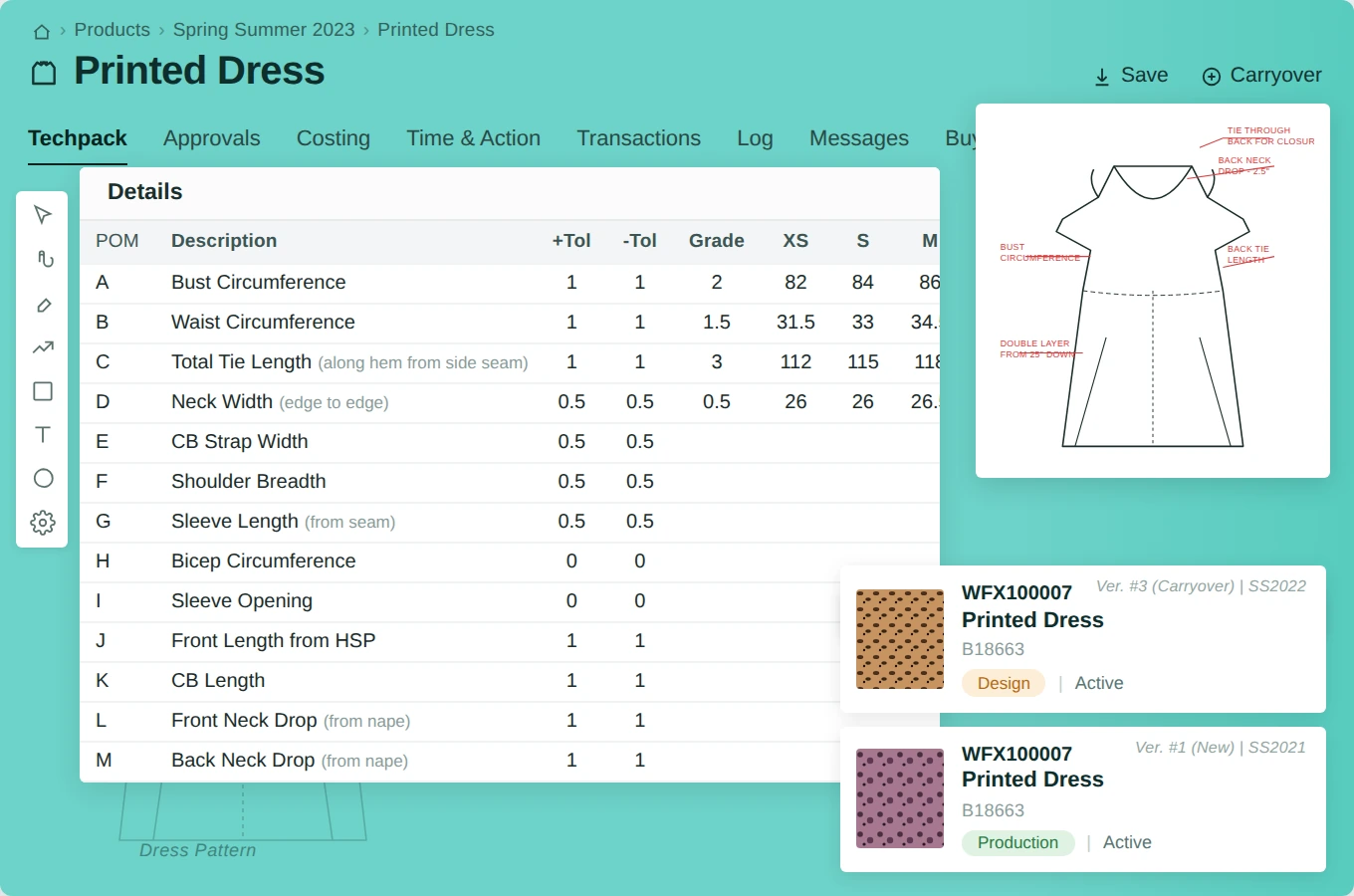
  3. Measurement and Grading Specs— Dimensions across every size in the range, complete with tolerances. Grading rules define how measurements scale between sizes. Industry standard tolerance for most woven garments is ±0.5 cm; knitwear typically allows ±1 cm.
  4. Color Definition and Colorways— Exact color specifications, always with Pantone or standardized color codes. Never rely on color names alone — “navy” reads differently across monitors and printing systems. Colorways show how colors interact across fabrics and trims.
  5. Bill of Materials (BoM)— Every material, fabric, trim, and hardware component: zippers, buttons, interfacing, labels, threads, care labels, hangtags. The BoM is referenced by both parties for costing and procurement — inaccuracies here directly impact margins. 
  6. Construction Details— Stitch types, seam allowances, pocket placement, button spacing, closure methods, and assembly sequence. This section leaves nothing to interpretation. Every assumption made here by the factory costs money later.
  7. Care Instructions—Details on how to wash dry, iron, or dry clean the product. Manufacturers provide this since they understand fabrics and dyes react when laundered. 
  8. Cost Sheet—A detailed list showing the costs of materials, trims, labor, and shipping for each unit. This helps provide precise price quotes, plan margins, and compare vendors across different manufacturers. 
  9. Comments and Feedback— A dedicated annotation section where the product development team documents sample review notes, revision requests, and approval status. Centralizing feedback here prevents the version confusion that comes from email threads. 

Spec Sheet vs. Tech Pack: Key Differences

These terms are often used interchangeably, but they serve very different functions in garment production. 

Spec Sheet A focused technical reference for straightforward products and established factory relationships. 

  • Length: 1–3 pages 
  • Contains: Measurements, sketches, materials, colors, and product codes 
  • Best for: Simple products, small production runs 

Tech Pack A comprehensive production guide that governs every stage of garment manufacturing. 

  • Length: 10–20+ pages 
  • Contains: Everything in a spec sheet — plus grading rules, BoM, construction methods, cost sheet, and visual mockups 
  • Best for: Complex products, large-scale production, and new manufacturer relationships 

The practical rule: If the product is simple and the factory knows your standards, a spec sheet suffices. If scale, complexity, or a new supplier is involved, a full tech pack is non-negotiable. 

Why Fashion Brands Need Tech Packs

Miscommunication is the most expensive problem in garment production. Research from the Textile and Apparel industry consistently shows that sampling errors — most of which stem from incomplete or ambiguous specs — account for 30–40% of product development delays. A well-structured tech pack eliminates the most common causes of those errors before they reach the sampling stage.

Beyond error prevention, tech packs deliver measurable operational benefits: 

  • Quality control becomes objective — samples are evaluated against documented specifications, not memory or subjective interpretation 
  • Vendor selection becomes comparable — identical specs sent to multiple factories produce like-for-like quotes 
  • Sustainability improves — precise material requirements reduce over-ordering and sampling waste 
  • Production tracking becomes reliable — stage-by-stage sign-offs are tied to documented standards 
  • Brand consistency scales — as SKU volume grows, standardized tech packs ensure quality doesn’t degrade 

How to Create a Fashion Tech Pack: Step-by-Step

tech pack creation

Step 1 — Build a table of contents. Use a template aligned to your factory’s requirements or build a checklist from the nine components above. Gaps here surface late and expensively. 

Step 2 — Gather all technical specifications. Compile flat sketches from all angles, finalized measurements, confirmed Pantone references, and material descriptions or samples before opening the document. 

Step 3 — Start with measurements and drawings. These are the most technically demanding sections. Lock them down before filling in surrounding details — changes to measurements cascade across the entire document. 

Step 4 — Specify materials and production methods. Define fabric handling requirements: grain direction, interfacing type, cutting method, and any special pre-treatment instructions. 

Step 5 — Add construction details. Document every assembly step with enough specificity that an unfamiliar team member at the factory could follow it without clarification. 

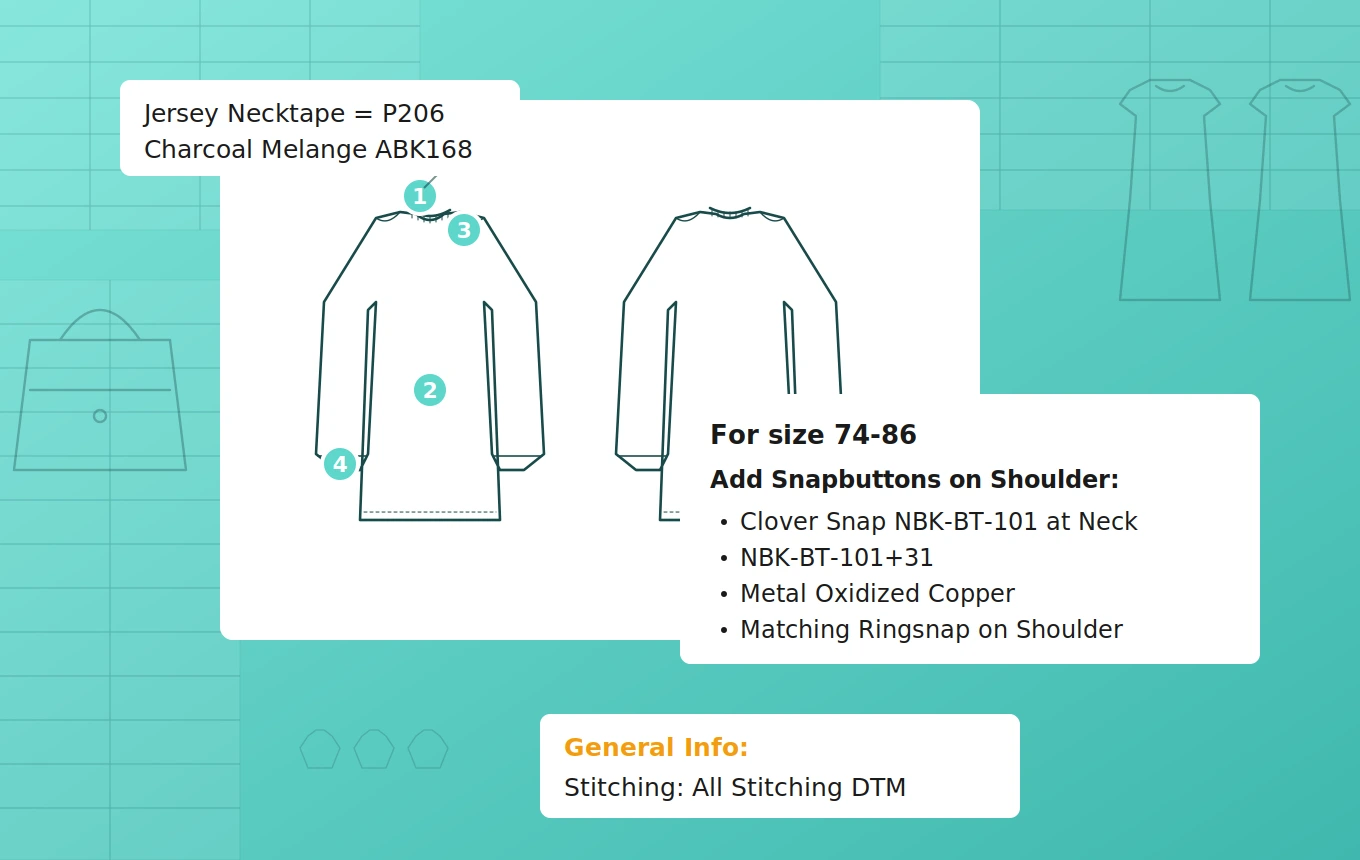
Step 6 — Annotate all images. Add arrows, callouts, and written instructions for every technical drawing. Never let an image stand without text support — factories interpret images differently than designers intend. 

Step 7 — Review against a checklist. Before sending, verify all nine components are complete, all color references are coded, and all measurements include tolerances. 

Best Practices for Annotating Images in Tech Packs

Annotating Images in Tech Packs

Factories interpret images differently than designers intend — and the gap between the two is where most sampling errors originate. These practices close that gap: 

  • Label every component explicitly. Don’t assume a factory will place a button at the right interval — specify it. “1-inch spacing between buttons” is unambiguous; a photograph alone is not. 
  • Use arrows and callouts to direct attention to critical details within technical drawings. 
  • Specify color codes, not color names. “Navy” means different things to different suppliers. A Pantone reference does not. 
  • Provide multiple views of each garment to eliminate blind spots in the factory’s understanding. 
  • Standardize symbols and terminology across all tech packs to build consistent communication habits with your manufacturing partners. 
  • Pair every image with written instructions. Images provide context; written specifications provide precision. Both are necessary. 

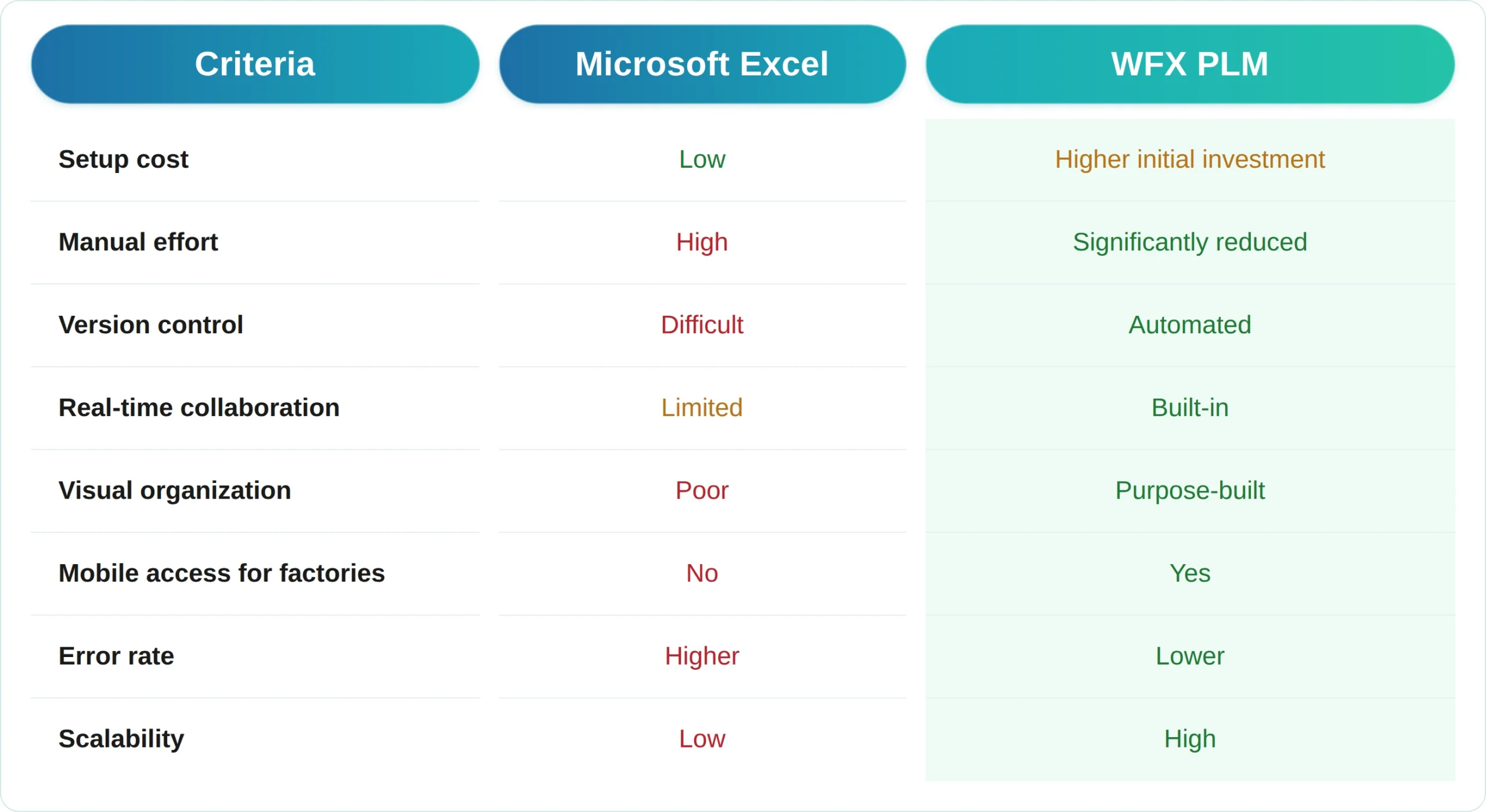
Excel vs. PLM for Tech Pack Creation

The tool you use to build tech packs directly affects how efficient and error-free your production process is. Most brands start with Excel — it’s accessible and familiar. But as SKU volumes grow, its limitations compound quickly. 

Excel vs PLM

For brands handling under 50 SKUs per season with one reliable factory, Excel suffices. Beyond that point, manual mistakes, version conflicts, and collaboration challenges cost more than software investment within two production cycles. 

Brands using WFX PLM report a reduction in sampling iterations from an average of 3.2 rounds to 1.8 rounds per style — directly translating into faster time-to-market and lower development costs. 

How to Build Tech Packs Faster

A T-shirt tech pack takes an experienced designer 1–2 hours. A detailed jacket can take 5–6 hours. Across a 200-SKU seasonal collection, that is 400–1,200 hours of design team time — before any revisions. 

Four strategies that compress this significantly: 

  • Build category-specific templates. A pre-populated template for trousers, one for woven tops, one for outerwear — each with standard sections already structured — eliminates setup time per style. 
  • Centralize all assets in one system. Time spent searching for reference images and previous-season sketches is invisible but substantial. PLM or a rigorously organized shared drive solves this. 
  • Standardize manufacturer relationships. Factories already familiar with your format and terminology require significantly less explanatory communication per style. 
  • Use purpose-built software. Modern PLM platforms are designed around the visual and technical demands of garment production — something spreadsheets were never built for. 

Frequently Asked Questions

How many pages is a fashion tech pack?  

A typical fashion tech pack runs 10 to 20 pages. Simple products like basic T-shirts may require fewer pages; complex outerwear or tailored garments can exceed 30 pages when construction details are fully documented. 

Who creates a tech pack in fashion?  

Tech packs are typically created by technical designers, product developers, or garment technologists. In smaller brands, this responsibility often falls to the lead designer. Increasingly, PLM software allows cross-functional teams, including design, merchandising, and sourcing, to contribute to and review the same document simultaneously. 

How is a tech pack different from a spec sheet? 

A spec sheet gives key technical details like dimensions, sketches, and materials in a simple format. A tech pack takes it a step further. It acts as a detailed production manual, including everything from the spec sheet along with grading guidelines, construction techniques, a materials list, pricing details, and design visuals. The main difference lies in the level of detail and use case. Spec sheets suit basic products or trusted factory partnerships. Tech packs however, are the go-to choice for large-scale or complicated production situations where clarity is critical. 

How much does it cost to make a tech pack?  

If created in-house, tech pack costs are primarily labor: 1–6 hours of a technical designer’s time depending on product complexity. Freelance tech pack creation typically runs $50–$300 per style depending on complexity and the designer’s rate. PLM software reduces per-style time significantly, lowering the effective cost at scale. 

Can I create a tech pack in Excel?  

Yes, you can, but it has its limits. Excel does not offer the visual layout, group collaboration, or version tracking that large-scale tech pack handling needs. If a brand works with over 50 SKUs each season, Excel may cause challenges that specialized PLM software can solve. 

What happens if a tech pack is incomplete?  

Incomplete tech packs lead to sampling errors, additional revision rounds, production delays, and in some cases, full production restarts. Industry data suggests that unclear specifications are the leading cause of first-sample failures — each additional sampling round typically adds 2–4 weeks and significant cost to the development calendar. 

The Bottom Line

A fashion tech pack is not administrative paperwork. It acts as the backbone of every piece of garment you create. Companies that focus on making clear and organized tech packs see quicker launches, need fewer sample adjustments, get better cost estimates, and build better partnerships with their manufacturers. Ignoring this process can put you behind. 

Having the right tools changes everything. WFX PLM is made for apparel development. It brings everything into one place—from creating tech packs to working with teams and factories—all the way from the first design to final approval for production. 

Brands using WFX PLM cut sampling rounds by 44%. See how it works for your team. 

Read Our Blogs

...
How PLM Software Helps Fashion Brands Reduce Time-to-Market (2026 Guide)

See how Fashion PLM software helps apparel brands reduce time-to-market by 30–35% in 2026.

Read More
...
Still Managing Apparel SKUs by Size & Color in Spreadsheets? It’s Costing You More Than You Think

Still Managing Apparel SKUs by Size & Color in Spreadsheets? It’s Costing You More Than You Think.

Read More
...
Spreadsheets vs. PLM: Why Fashion Brands That Still Rely on Excel Are Falling Behind

Fashion PLM helps brands replace spreadsheets with faster collaboration, accurate costing, and streamlined development.

Read More